
Growing Care
Role
User research
Brainstorming & wireframing
UI/UX design
Prototyping
Duration
8 Months
Background
Babies who are born very prematurely, often have complicated medical problems and are usually admitted to a neonatal intensive care unit (NICU). Studies show that, in a NICU environment, parents participating in the care of their preterm infant supports the infants’ wellbeing and parent-infant bonding. For the Maxima Medical Centre, parental participation is currently suboptimal because media for communication between parents and the medical staff are outdated. Therefore, the goal of this project was to create a working prototype aimed to digitalize information or communication processes in the NICU.
Research
To understand life in the NICU and to determine initial user needs I:
- Empathised with NICU parents and nurses (shadowing nurses, interviews, reading blogs of NICU parents).
- Explored existing products & services that digitalized information or communication processes in the NICU.
- Conducted a literature study (pro’s and con’s for digitalising processes in the NICU).

From the research & empathising phase I discovered that:
- There is an existing mHealth application available for Dutch NICU’s called ‘ZorgPunt’ that meets several wishes of the Maxima Medical Centre. We decided that proposed design solutions should be able to be used both as stand-alone and as an additional functionality to the ZorgPunt app.
- An app is not directly visible in the space, thus people can opt-out and forget about using the app. Therefore, my aim was to explore design solutions that place (parts of) the mobile application in the space, thus making the app part of the NICU environment. This facilitates parents to make use of mHealth technologies, which might solve the current issue that parents don’t read information flyers or fill in forms consistently.
Ideation & Conceptualisation
The outcomes of the research phase were used as input for the brainstorm session. After the brainstorm session we ended up with 100+ post-its which we structured by creating an affinity diagram.

At a later time, I selected ideas based on a list of criteria’s such as “feasible within the timeframe of the project” and “implementable in the current NICU infrastructure”. This resulted in five concepts which were evaluated by stakeholders.
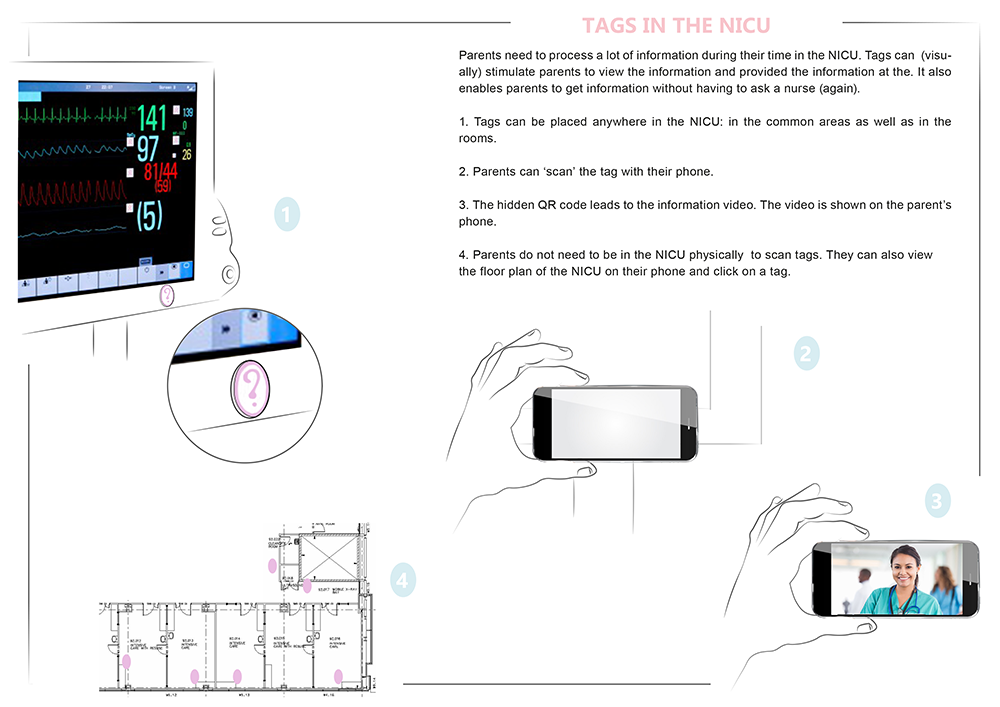
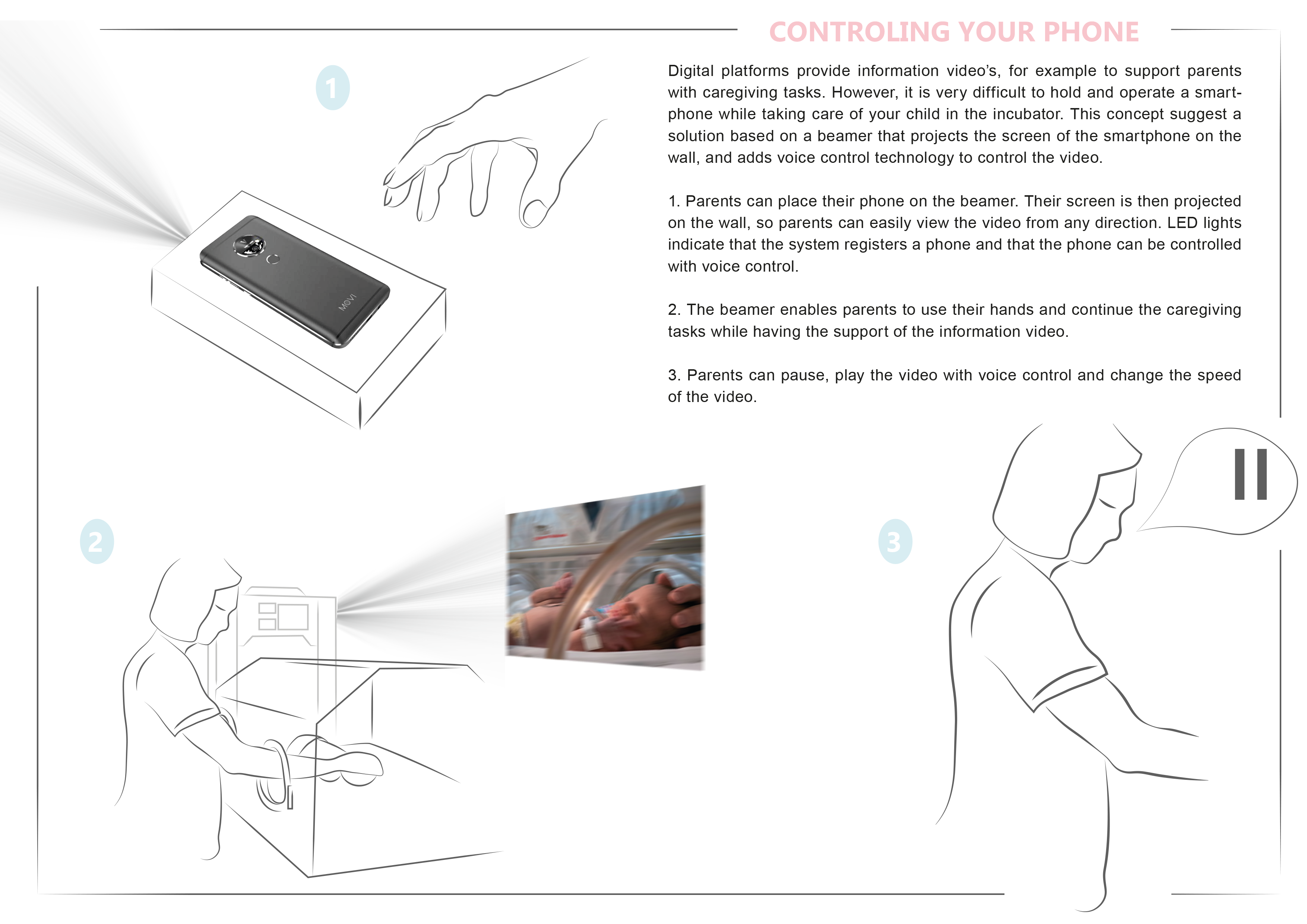
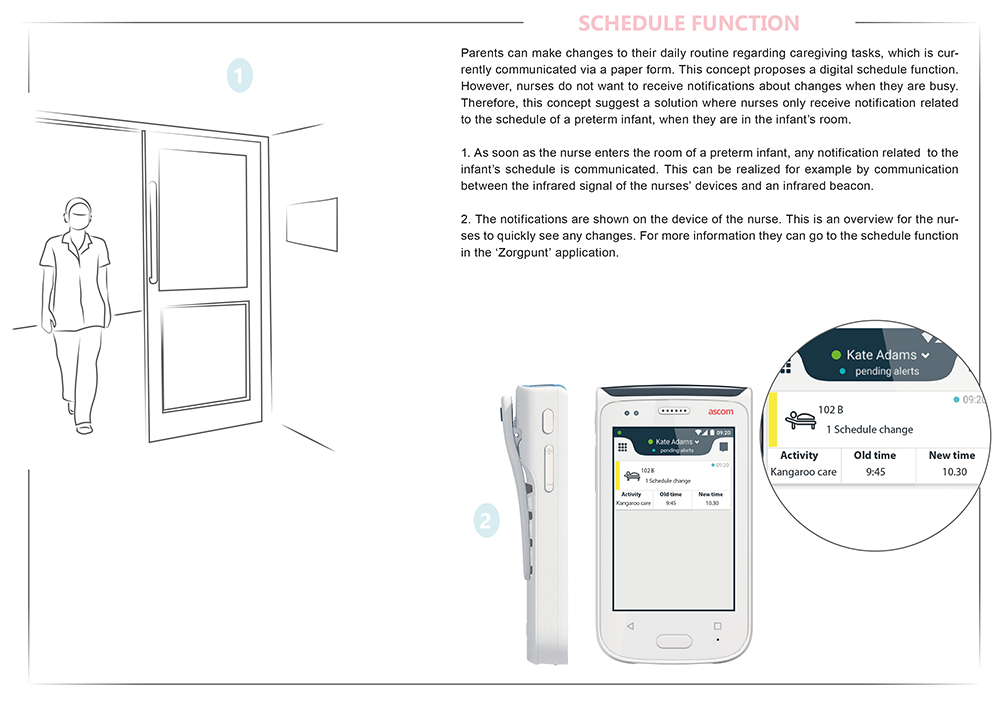
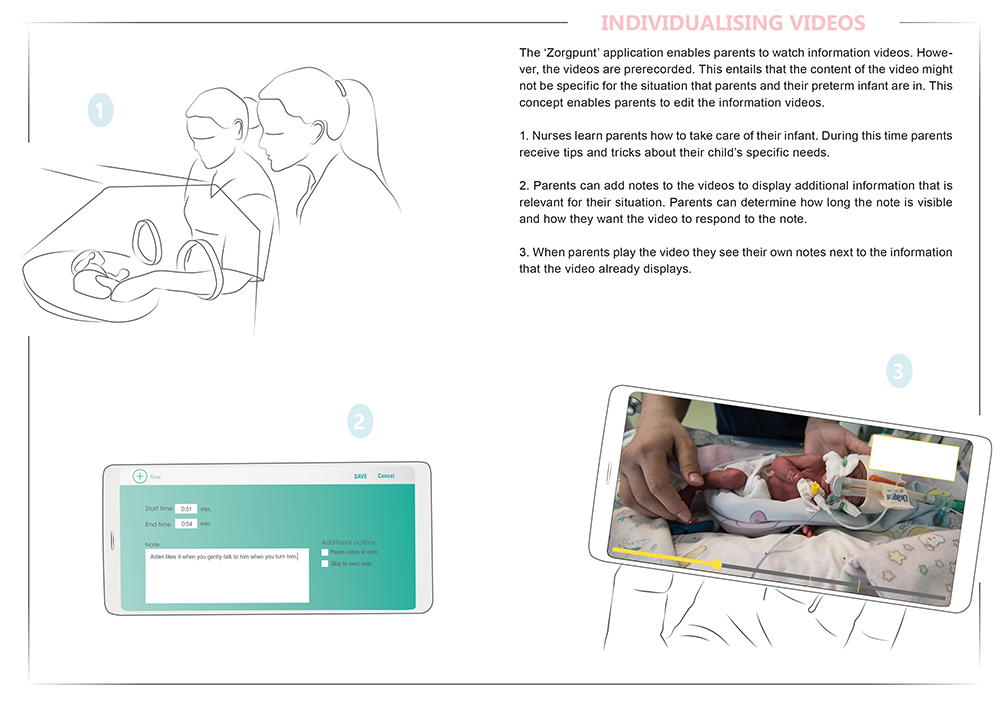
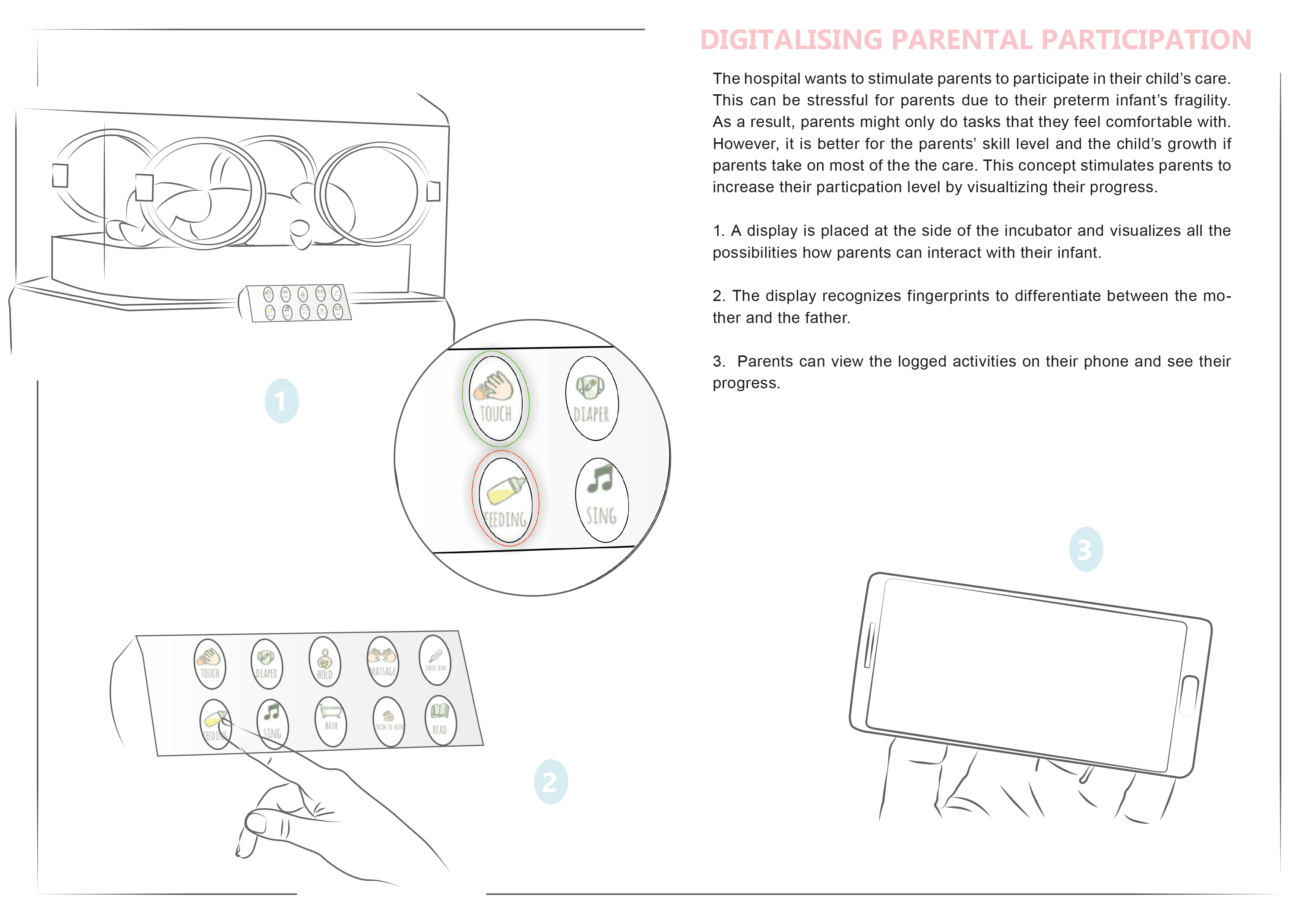
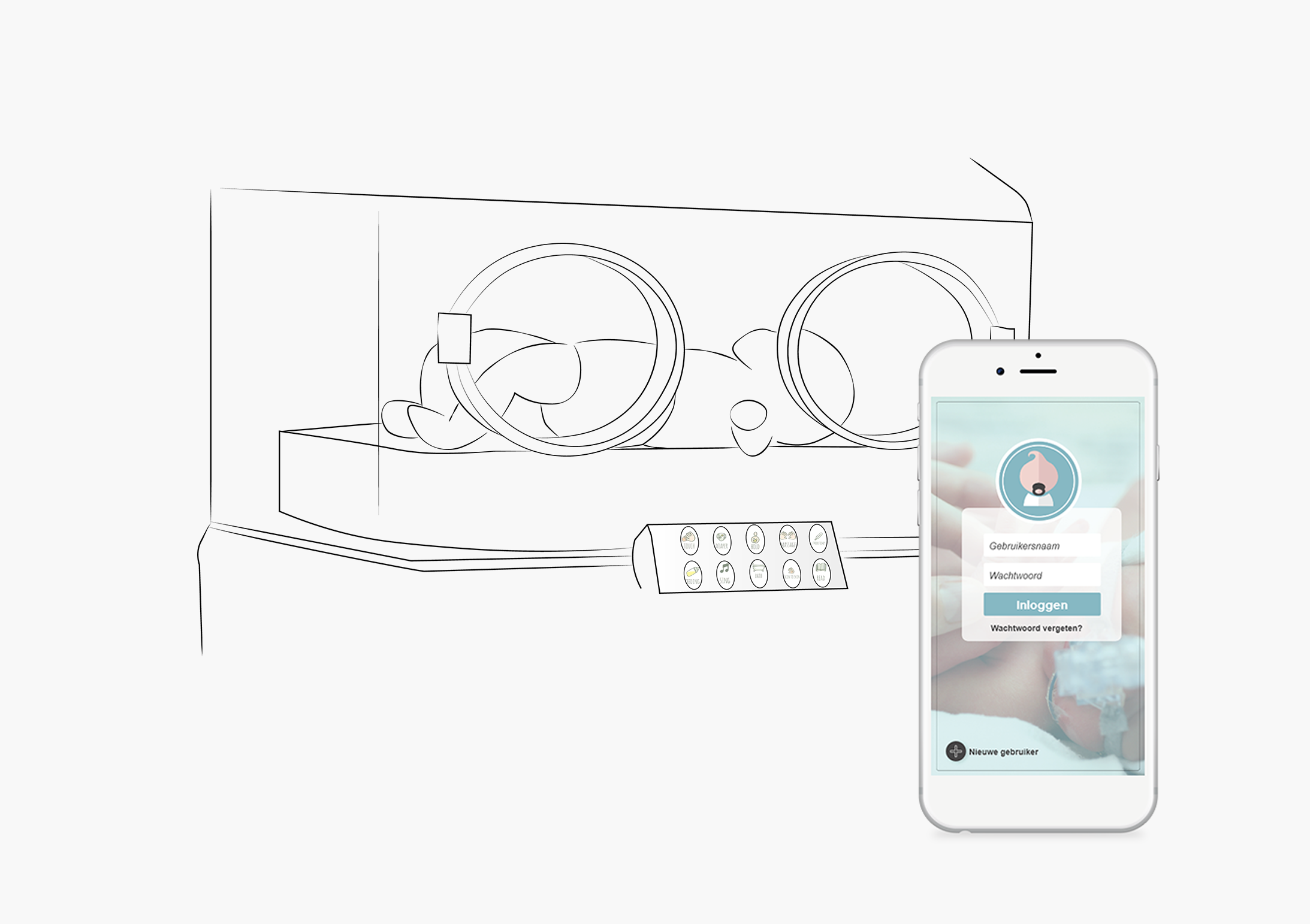
After the feedback of the stakeholders, we ended up with one (revised) concept. The final concept consists of a device that is attached to the side of the incubator, and an app for parents and nurses. The concept aims to (further) improve communication between parents and nurses in the NICU. The app includes a timetable function regarding caregiving activities. The function of the device is to log parental participation in order to generate a caregiving trajectory. In this way, parents can see their development regarding the caregiving of their child, and nurses can identify how to support parents.

App
In order to determine how to incorporate a timetable function in the routine of nurses, I first needed to gain a better understanding of the current situation regarding their daily routines. I chose to design a game to obtain the insights, because it enabled me to control the occurrence of several scenario’s and thereby see how nurses respond to that.

I created sketches for both the application for nurses and parents to define the basic structure of the apps. After that, I used Adobe XD to create wireframes. These wireframes were evaluated by a team of experts that consisted of a clinical researcher, a neonatologist, and a medical psychologist who supports parents in the NICU.

The final design of the app for parents consists of:
- Profile page: here parents can see their account settings.
- Timetable function: parents can create new schedule items or edit existing items. Each schedule item has the option to send messages to nurses about that schedule item.
- Caregiving trajectory: parents can view their progress based on three representations. A daily representation of the logged caregiving activities, a weekly summary of the logged caregiving activities, and a total overview of all the days their child was in the NICU.

The final design of the app for nurses consists of:
- Floorplan of the NICU: displays icons at the rooms of parents who use the app.
- Timetable function: nurses can create new schedule items, edit existing items, and see items that parents created. Each schedule item has the option to post messages related to that item.
- Caregiving trajectory: the caregiving activities that were logged by the parents are represented by a weekly summary, and a total overview of the caregiving trajectories to give an overall idea of the behavior of parents in the NICU.

Device
As a starting point, I had interviews with the clinical physicist, the medical staff, and NICU parents, in order to create a list of requirements based on materials, safety, aesthetics, functionality and interaction of the device. Subsequently, I wanted to develop and determine the interaction between the device and the intended users. Therefore, I created a low-fi prototype out of carton to use in a Role-Playing session. Finally, I wanted to test how do users evaluated the feedforward and feedback communication of the device. I created a working prototype that enabled the interaction between the user and the system, and asked participants to evaluate the experience.

The final iteration of the device combined the insights from the previous workshops and user test. Based on the requirements to design for a IC environment, I decided to 3D print the exterior case out of ABS. To finish the exterior, I conducted a process of sanding, applying primer, and spray painting. After the device was spray painted, a company added the icons to the exterior with screen printing. The final step consisted of incorporating the electronics inside the housing of the device.

The final design of the device displays seven ways for parents to interact with their infant, which are described as caregiving tasks. Parents can log caregiving activities by placing their finger on the fingerprint sensor. Light cues are used to communicate the feedback of the device in order to improve user-system interaction. Parents also have to option to turn the device on or off with the aid of a switch that is incorporated in the side of the exterior. Finally, the device can be attached and detached from the side of the incubator, using the suction caps.

Testing
The aim of the usability test for the apps was to determine how parents and nurses would experience using a mobile application to communicate information about the daily routines of parents, instead of communicating via a paper timetable. Besides that, the app enables parents to record Kangaroo Care sessions and other caregiving activities, so that nurses gain more insights on how to support parents regarding parental participation. The app was used by 4 parent couples, where each couple used the app for 8 days. After they participated, each couple was asked to evaluate the use of a device to log activities.
The device could not be tested in a real life setting due to regulations. Therefore, a demo setting was used to answer the following questions:
- Does the device add additional value compared to the use of a tablet to log data? Please explain.
- How does the device influence caregiving tasks?
- What improvements can be made to the current prototype?

After interviewing and observing all the participants, the data was analysed. Main insights from the user tests are:
- All parent couples were enthusiastic about the app and believe that it further improves the communication with nurses, and stimulates parental participation. None of the participants felt added pressure by viewing their caregiving trajectories.
- Fathers especially appreciated the different representations of the caregiving trajectories, while the mothers mostly liked the visualisations of Kangaroo Care sessions.
- Some nurses really appreciated the option to send messages to parents. However, one nurse felt pressured to send messages to parents because other nurses did.
- Parents mainly liked the positioning of the device in contrast to a tablet. For example, they can log an activity without stepping away from the incubator while interacting with their child. Besides that, they expressed that the device is more fun and engaging than a tablet.